Microsoft 365 has become the backbone of modern business communication and collaboration. From email and Teams to SharePoint and OneDrive, organizations rely on Microsoft 365 every day to keep employees productive and connected.
But as cyber threats continue to evolve in 2026, many business owners are asking an important question:
🔒 Free Microsoft 365 Security & Cyber Insurance Assessment
Cyber insurance providers are raising their security requirements. Many businesses do not know whether their Microsoft 365 environment meets modern security expectations until they apply for insurance or experience a security incident.
TEKYHOST offers a complimentary Microsoft 365 Security & Cyber Insurance Assessment for Canadian businesses and nonprofits.
Your Assessment Includes:
- ✅ Microsoft 365 Security Review
- ✅ MFA and Conditional Access Review
- ✅ Email Security and Anti-Phishing Review
- ✅ Microsoft Secure Score Analysis
- ✅ Endpoint Protection Assessment
- ✅ Cyber Insurance Readiness Check
- ✅ Prioritized Security Recommendations
Our team will help identify security gaps and provide practical recommendations to strengthen your Microsoft 365 security posture.
TEKYHOST – Toronto Managed IT & Cybersecurity Services
Is Microsoft 365 secure enough for business on its own?
The short answer:
Microsoft 365 provides a strong foundation for security — but default configurations alone are no longer enough to protect most businesses from modern cyber threats.
At TEKYHOST, we regularly help Toronto and GTA businesses secure their Microsoft 365 environments against phishing attacks, account compromise, ransomware, and unauthorized access. What we often find is that many organizations are using Microsoft 365 with critical security gaps still exposed.
Why Microsoft 365 Is a Major Target for Cybercriminals
Microsoft 365 is one of the most widely used business platforms in the world. That popularity also makes it one of the biggest targets for attackers.
Today’s cybercriminals are specifically targeting:
- Business email accounts
- Microsoft Teams users
- SharePoint and OneDrive data
- Remote workers
- Weak passwords and stolen credentials
- Poorly configured security settings
For small and mid-sized businesses, even a single compromised account can have serious operational and financial consequences.
A compromised Microsoft 365 account can quickly lead to:
- Invoice fraud
- Wire transfer scams
- Internal phishing attacks
- Data theft
- Ransomware infections
- Compliance violations
- Business downtime
Common Microsoft 365 Security Gaps We See
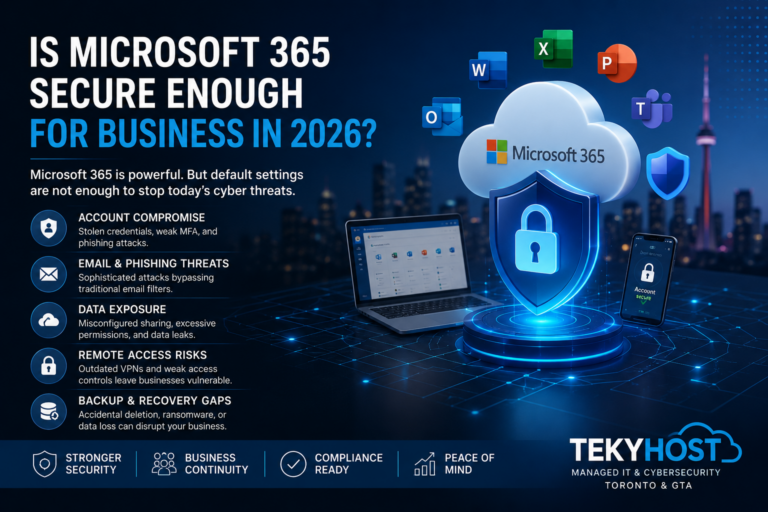
Many organizations assume Microsoft automatically secures everything by default. Unfortunately, that is not the case.
Here are some of the most common Microsoft 365 security issues we encounter:
MFA is one of the most important security protections available, yet many businesses still:
Multi-Factor Authentication (MFA) Not Fully Enforced
Have users without MFA enabled
Allow weak authentication methods
Exclude administrators from MFA
Lack Conditional Access policies
Without properly enforced MFA, stolen passwords can easily lead to account compromise.
Phishing remains one of the top attack methods targeting businesses in 2026.
Weak Email Protection Against Phishing
Impersonation emails
Credential harvesting pages
QR-code phishing
Business email compromise (BEC)
While Microsoft includes some email filtering, many businesses still require advanced phishing protection, user awareness training, and ongoing monitoring to reduce risk effectively.
We frequently see organizations with:
Overprivileged Admin Accounts
Too many global administrators
Shared admin accounts
No privileged access controls
Poor password hygiene
Administrative accounts are highly valuable to attackers. If compromised, they can provide access to the entire Microsoft 365 environment.
One of the biggest misconceptions is that Microsoft fully backs up customer data indefinitely.
Missing Microsoft 365 Backup Protection
Accidental deletion
Ransomware
Malicious insiders
Retention policy issues
Independent backup protection for Microsoft 365 remains a critical part of business continuity planning.
Remote and hybrid work continue to introduce new security risks.
Unmanaged Remote Access
Verify user identity continuously
Validate device security
Restrict unnecessary access
Reduce lateral movement risks
Businesses relying on outdated remote access methods may be exposing themselves to unnecessary risk.
Why Default Microsoft 365 Security Is No Longer Enough
Cyber threats have become significantly more sophisticated in recent years.
Modern attackers now use:
- AI-assisted phishing campaigns
- MFA fatigue attacks
- Session hijacking
- Token theft
- Social engineering
- Business email compromise tactics
As a result, securing Microsoft 365 today requires more than simply enabling basic settings.
Organizations should be implementing:
- Conditional Access policies
- Identity protection
- Endpoint security
- Email authentication (SPF, DKIM, DMARC)
- Security awareness training
- Threat monitoring
- Backup and recovery solutions
- Zero Trust remote access
- Continuous security reviews
How TEKYHOST Helps Secure Microsoft 365
At TEKYHOST, we help Toronto and GTA businesses strengthen Microsoft 365 security through a layered cybersecurity approach designed for modern threats.
Our managed security solutions can include:
- Microsoft 365 security hardening
- MFA and Conditional Access deployment
- Advanced phishing protection
- Threat monitoring and response
- Security awareness training
- Email authentication protection
- Microsoft 365 backup solutions
- Zero Trust remote access with Cato Networks
- Endpoint and identity protection
- Ongoing security reviews and compliance support
We work with organizations across multiple industries to help reduce cybersecurity risk while keeping teams productive and secure.
Final Thoughts
Microsoft 365 can absolutely be a secure platform for business — but only when it is properly configured, monitored, and protected.
In 2026, cybersecurity threats are targeting businesses of all sizes, and attackers increasingly focus on identity, email, and remote access vulnerabilities.
Businesses that rely solely on default settings may be leaving critical gaps exposed.
A proactive, layered security strategy is essential for protecting:
- Business communications
- Customer data
- Employee accounts
- Remote access
- Operational continuity
Free Microsoft 365 Security Assessment
Want to know whether your Microsoft 365 environment is properly secured?
TEKYHOST offers a free Microsoft 365 Security Assessment for Toronto and GTA businesses.